
ASP.NET WebForms Performance Optimization: Common Issues and Fixes

TL;DR
Slow ASP.NET WebForms applications are usually caused by oversized ViewState, excessive postbacks, inefficient SQL queries, lack of caching, and poor database connection handling. Improving performance starts with reducing ViewState bloat, minimizing unnecessary postbacks, optimizing database queries and indexes, implementing output caching, and leveraging connection pooling. Regularly auditing page size, query performance, caching coverage, and rendering weight can significantly improve page load speed and overall user experience. For long-term stability and performance, businesses can benefit from professional ASP.NET WebForms maintenance services or experienced WebForms developers.
Why does ASP.NET WebForms performance optimization matter?
- Slow pages frustrate users.
- Heavy ViewState increases page size.
- Repeated postbacks add extra server work.
- Slow database calls hold the whole page hostage.
ASP.NET Web Forms keeps state between requests, which is useful, but it also creates room for bloat. Microsoft explains that ViewState is stored in hidden fields and sent back on each round trip, so the page gets heavier when that state grows.
So the job is simple: find the expensive step, cut it down, then measure again. That is the practical core of ASP.NET WebForms performance optimization.
What are the most common ASP.NET WebForms performance issues?
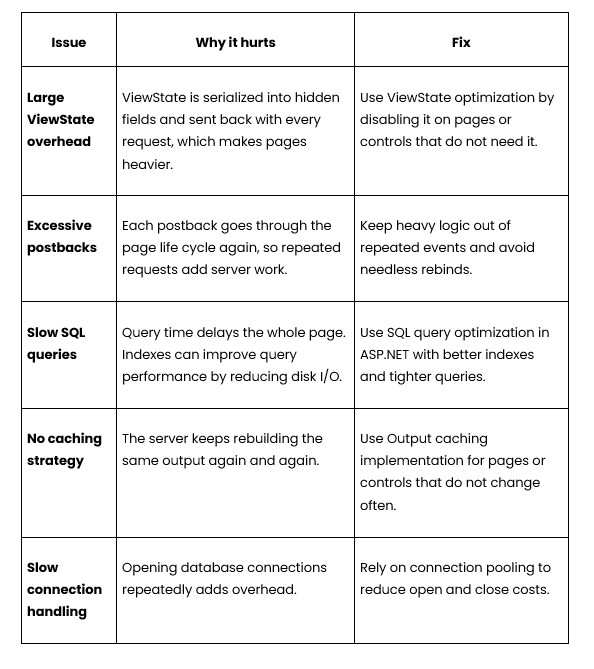

How do you fix large ViewState overhead?
- Disable ViewState where the control does not need to remember state across requests.
- Keep ViewState only on controls that depend on it.
- Check the page size after each change.
Quick ViewState Checklist
- Do I need the value after postback?
- Can I store it server-side instead?
- Can I turn it off for this control?
- Did the page shrink after the change?
That is the cleanest path to ViewState optimization without breaking the page.
How do you reduce excessive postbacks?
Move expensive work away from code that runs on every postback. Web Forms runs through the life cycle again on each request, so repeated work gets expensive fast.
Avoid binding the same data again when the request is already a postback and the data has not changed.
Keep event handlers light. Long-running logic in page events will slow the whole request.
Good Habits for ASP.NET Page Load Speed
- Load only what the page needs.
- Skip duplicate data calls.
- Reuse cached data when possible.
- Keep the page lifecycle work short.
How do you handle database bottlenecks?
- Use indexes that match the query pattern.
- Keep SQL queries narrow.
- Use connection pooling.
Simple database fix table


When does caching help most?
- When the same content is requested often.
- When the page changes slowly.
- When the server keeps repeating the same render work.
Microsoft documents output caching for pages, controls, and HTTP responses and notes that it stores generated output in memory. That makes output caching implementation a practical fix for repeat-heavy pages.
What should a WebForms optimization checklist include?
- Check ViewState size.
- Check postback count.
- Check SQL query time.
- Check connection pooling.
- Check caching coverage.
- Check page rendering weight.
Frequently Asked Questions
What is the biggest cause of slow WebForms pages?
Large ViewState, repeated postbacks, and slow SQL are the usual suspects.
Should I disable ViewState everywhere?
No. Turn it off only where the page or control does not need it.
Does output caching work for Web Forms?
Yes. Microsoft documents output caching for pages, controls, and HTTP responses.
Why do postbacks slow the page down?
Every postback runs through the page life cycle again, which adds more work on the server.
Can better indexes help ASP.NET WebForms performance optimization?
Yes. Better indexes can reduce disk I/O and improve query performance.
What helps more, caching or SQL tuning?
It depends on the bottleneck. If the same page data is reused, caching helps. If the delay is inside the query, SQL tuning helps more.
Conclusion
- Trim ViewState.
- Cut unnecessary postbacks.
- Tune slow queries.
- Cache repeat content.
- Use connection pooling.
That is the practical route to ASP.NET WebForms performance optimization. For older sites that still need care, ASP.NET WebForms Maintenance Services or a skilled team of Hire ASP.NET WebForms Developers can help keep the app fast and stable over time.